
What we build
Built around how your business runs.
Sixteen things we have built so far, across winning work, running jobs, money and the office. Four of them are shown up close below, on our Harbour House sample job. The house, the client and every figure in it are fictional.
Winning work
From the first enquiry to a price- Lead follow up and CRMEvery enquiry answered from your address, a card on the board, a next step for every missed call.
- Takeoffs from your plansQuantities by trade from the PDF set, with a checker that shows the maths on the drawing.
- Trade packagesThe scope split by trade, ready to send out, with the quotes that come back compared.
- Tender checksA tender or a quote checked line by line against the takeoff, in your cost codes.
Running jobs
Once the contract is signed- A scheduling assistantYour program, with notices to each trade at four, two and one week out.
- Subbie complianceInsurances and licences chased before they lapse, without writing the same email nine times.
- Weekly client updatesWhat moved on their home, drafted from site notes and photos, in your voice.
- Contract readerFlags the clauses that cost you money before you sign, and drafts the questions to send back.
Money
In, out and in between- Receipts and invoices into XeroRead, coded to the job, GST and ABN checked, ready for you to approve.
- Variations from a voice notePriced off your own rate card, with the reason and the time impact, ready to sign.
- Progress claimsWith retention, GST and the running position on the job.
- Your price book, loadedYour rates and cost codes, so everything that gets priced is priced your way.
The office
You and the people around you- An assistant that knows your businessInstalled on your machine with your rate card, job codes, suppliers and the way you word things.
- An AI audit of your weekWhere the hours actually go, and what is worth automating first.
- Training for your teamHands on sessions, so it is not only you who can use it.
If it happens in your office every week, we can probably build it. If it should stay with a person, we will tell you that on the first call.
Tell us what eats your week01 Leads to signed
A board you can run the week from.
We set up the CRM, usually GoHighLevel, with your stages, your emails and your texts. Every enquiry gets a reply straight away. Every missed call has a next step.
New lead
Enquiry in. Sample email already sent.
- Website
- Meta form
- Referral
No answer
Each attempt moves it along, with a text and an email between calls.
- NAx1
- NAx2
- NAx3
- NAx4
Call booked
Reminder the day before and an hour before.
- Plans requested
Call held
Notes from the call land on the card.
- Plans run
Proposal sent
Follow up at day 2 and day 5 if nothing comes back.
- Follow up
Closed
Signed goes to onboarding. The rest stay on file.
- Signed
- Ghosting
- Not interested
The stage names, the timing and every word of every message are yours to approve before anything is switched on.
02 Money and clients
The paperwork, in and out.
Each one is a draft you approve, until you decide it can run on its own. Three of them, as they land with you:
Hi both, here is what moved on your home this week.
- Frame inspection passed on Tuesday.
- Roof sheets are on site and the roofer starts Monday.
- Windows are confirmed for week six.
 4 photos from site attached
How a receipt gets into Xero
03 Running jobs
The program, and the chasing that goes with it.
Your standard program as a template, adjusted per job. The notices, the reminders and the warranty dates after handover all run from it.
| TRADE | WK 1 | WK 2 | WK 3 | WK 4 | WK 5 | WK 6 | WK 7 | WK 8 |
|---|---|---|---|---|---|---|---|---|
| Site and slab | ||||||||
| Frame | ||||||||
| Roof | 4 wk notice | |||||||
| Windows | 2 wk notice | |||||||
| Rough in | 1 wk notice | |||||||
| Pool and landscaping | ||||||||
Sample program, weeks 1 to 8. Hatched bars are outdoor trades. Red line is today. Swipe the chart to see weeks 4 to 8.
04 Pricing
From a PDF plan set to quantities you can check.
Every quantity is measured off the drawings, grouped by trade and linked back to the sheet it came from. Where the plans are unclear we do not guess: it goes on a list of questions for the architect.
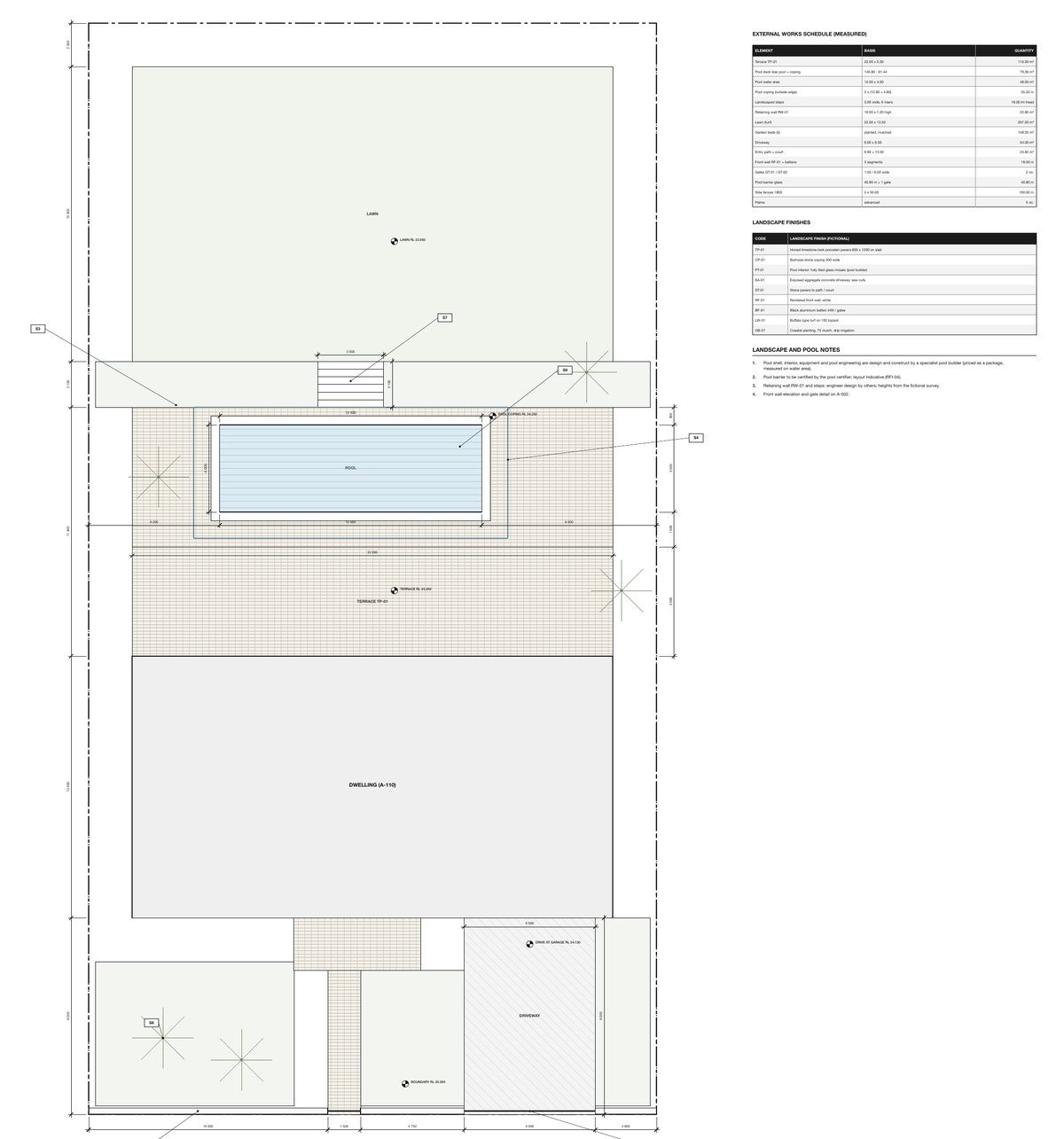
CON-004Slab concrete, 32 MPa34.32 m³
CON-003Termite barrier68.00 lmSITE-001Strip topsoil under building and paving592.62 m²1. Each sheet measured, with the working. One line opened up.
2. The job: 35 A1 sheets, two storeys and a pool.
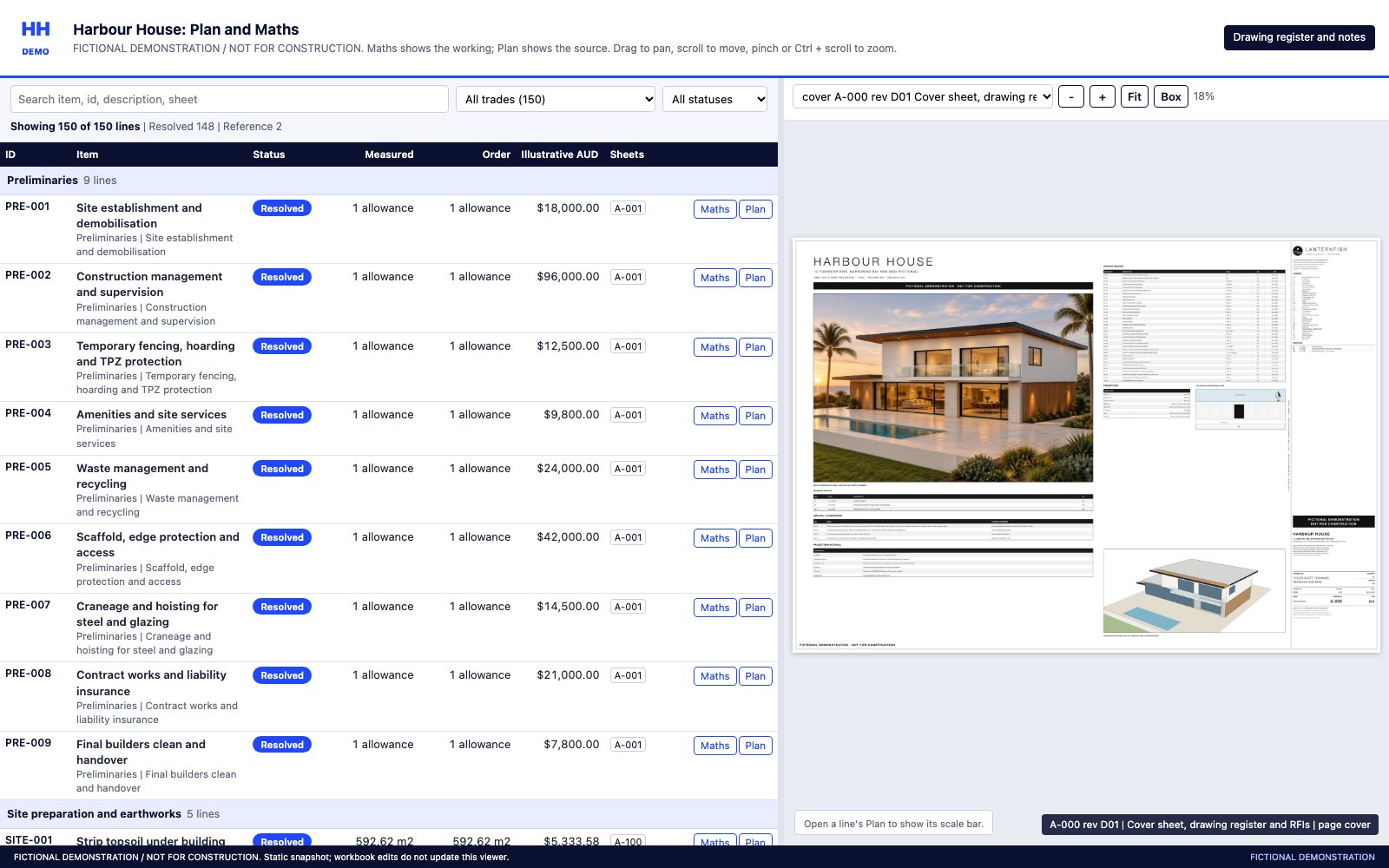
3. The checker. Click Maths to see the sum, click Plan to see where it sits on the drawing.
- In
- Architectural plans as a PDF. Engineering and specifications if you have them.
- Out
- Excel takeoff with formulas, the checker, the drawing register, open questions. Priced on your rates if you want it.
- You do
- Check it. Change any input and the totals follow.
What we will tell you not to automate
Some things should stay with a person.
Anything where the relationship is the product, anything you do twice a year, and anything a tool you already pay for does well. We say so on the first call.
The first step
Send us one set of plans.
Before we have even spoken, you will see what we do on your own job, not on a sample.